A named RevOps owner does, before install. Clay's Skills Marketplace puts a GTM play one command away from your live accounts. Someone has to decide what the skill can read, what it can write, and which accounts are worth the credits.
I'm Michael Thomas Zajac, a sales operator in Hermosa Beach. I wired Clay into the GTM engine I built at SuperSend, and the most useful thing that engine did was decide when Clay did not get called.
What did Clay just open?
On September 29, 2026, Clay opened its Skills Marketplace, as DailyRevOps reported. Skills are reusable instructions for coding agents like Claude Code, Codex, and Cursor. They cover contact finding, list building, account scoring, signal tracking, and outbound personalization.
A few details matter for anyone who owns the GTM stack:
- Skills are free to install. Runs that pull Clay data spend your Clay credits.
- Each skill page lists its inputs, steps, output, and the data connections it needs.
- Community creators can submit skills. A person at Clay reviews each submission during early access.
I like this. It moves a written play closer to something you can actually test. A method one operator figured out for one campaign can be reused by the next operator without rebuilding every prompt and API call.
What breaks when anyone can install a play?
The buying decision disappears. No contract, no procurement step, nobody asking what it costs. One command and a GTM play is sitting next to your live accounts.
Three things go sideways from there.
The method travels, good or bad. A skill is not a new data source and not a promise that a score or a signal is right. It is a method. A bad method runs just as efficiently as a good one.
Credits follow wherever the agent points. The install costs nothing. The run costs credits. An account-scoring skill pointed at your whole TAM spends on accounts nobody on your team will ever work.
Clay's review is not your review. It is a real distribution control, and I am glad it exists. But Clay does not know your field definitions, your consent rules, or who owns which record in your CRM. A skill can be right for one stack and wrong for yours.
How did I gate Clay at SuperSend?
I was the first commercial hire at SuperSend. I sold, and I built. The GTM engine was an internal web app I built in Cursor, and it was the hub. Clay was not the hub. I coded Clay in as a webhook into the engine and called it over MCP.
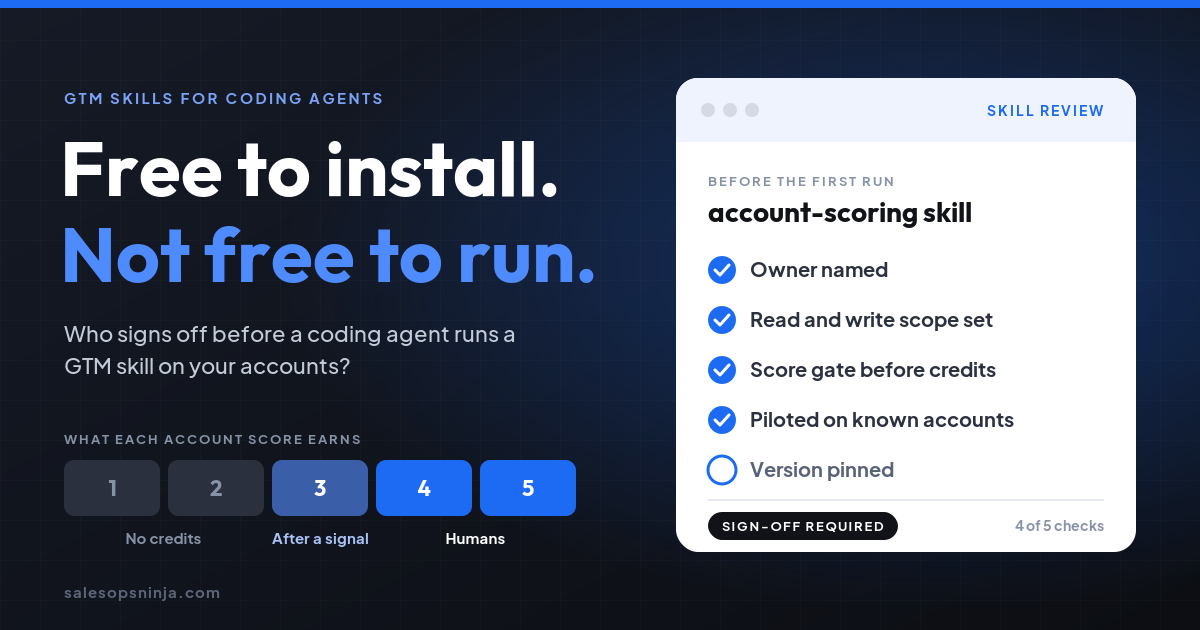
Every domain got an ICP score from 1 to 5 before anything spent money on it. The score decided whether Clay ever got called:
- 1s and 2s never burned Clay credits. Cheap channels only, and capture the hand raiser if one showed up.
- 3s waited for a hand-raise or a signal. Then they went to automation.
- 4s and 5s got humans. High-fit logos went through Clay for waterfall enrichment on the top 3 personas, then wrote back to the CRM.
Clay was always one call away. The engine only made that call when the score said the account was worth it. That rule was the sign-off, written into the system instead of left to whoever ran the job that day. I broke down the full tiering in Should an outbound agent work your pipeline for weeks without a score gate?
What did the gate produce?
That motion produced 10 net-new enterprise accounts and approximately $400K in net-new ARR in 2.5 months.
The enrichment spend went where the humans were going to work. That is the whole trick. A skill marketplace makes the calling easy. It does not decide which accounts deserve the call.
What should you check before you install a GTM skill?
Here is the Monday checklist. Run it once per skill, before the first install in a working environment.
- Name one owner. A person, not "the GTM team." That person approves the install, the updates, and the rollback.
- Read the instruction file, not just the listing. Write down the creator, the version, the dependencies, the connector scopes, and where the data goes.
- Split read from write. A read-only research skill and a skill that writes to your CRM or launches messaging need different approval paths. Keep sends and CRM writes behind a human review during the pilot.
- Gate the accounts before the credits. Decide which score tiers the skill may run on. If an account has no score, the skill does not touch it. Low fit never calls it.
- Pilot on accounts you already know. Pick a handful with known outcomes. Check duplicates, missing fields, and no-match cases. Count credits per usable result and how many results a human had to fix.
- Pin the version. Keep a short allowlist for production and record the exact version you tested. If the author changes the method, rerun the checks.
- Keep the trail. For each run, log the input list, the skill version, the run time, the CRM record ID, and the review decision. When a bad message goes out, you will want to know whether it was the data, the match, the skill, or the edit.
The install is free. The sign-off is the job. Give it an owner before the first run, not after the first credit bill.